

Retail SEO is the process of optimizing a retail brand’s online presence to attract shoppers through organic and AI-driven search. And convert that traffic into in-store visits and online purchases.
Unlike typical Ecommerce sites, retailers must manage:
- Physical store locations
- Seasonal inventory
- Large product catalogs
A standard Ecommerce SEO strategy rarely accounts for these layers. That’s why SEO for retail stores requires a specialized approach. This guide covers tactics designed for omnichannel retailers that want to drive both online and offline sales.
The Role of Retail SEO in Driving Sales Performance
Retail SEO builds compounding returns across the customer journey.
It captures search intent from initial research through the final transaction, whether that transaction happens online or in a physical store.
The result is higher lead quality and lower acquisition costs.
Here are a few other reasons:
- Introduces your brand before purchase intent exists: A person searching “how to style a small living room” has no purchase intent at that moment. But that query often begins a buying cycle. Retailers that provide useful guidance during this research phase create early brand awareness. When the same shopper later searches for furniture stores or specific products, the brand that helped them earlier is often the one they remember—and the one they visit.
- Captures shoppers when they’re ready to spend. Searches like “best running shoes for flat feet” or “affordable patio furniture near me” often signal strong purchase intent. Retail SEO ensures your brand appears at that moment.
- Converts local searches into store visits. Queries like “shoe store open now near me” often signal immediate buying intent. SEO for retail websites ensures your Google Business Profile, store pages, and contact details appear clearly when that search happens. Making it easier for nearby shoppers to find and visit your store.
✅Related: Wondering if SEO is the right fit? Explore in detail why SEO is important for long-term business growth.
How Retail SEO Differs From Ecommerce SEO and Why a Different Approach Is Required
Retail SEO requires a fundamentally different approach from traditional Ecommerce SEO because it must support both online and offline conversions.
While Ecommerce SEO focuses purely on driving online sales, retail SEO must also capture local intent, manage physical store visibility, and convert digital searches into in-store visits.
Here are the key differences:
| Factor | Retail SEO | Ecommerce SEO |
| Primary Objective | Drive both in-store traffic and online revenue | Drive online revenue only |
| Search Intent | Mix of local, product, and research queries | Mostly product and transactional queries |
| Local SEO | Core component. Requires optimized Google Business Profiles, store pages, and map visibility | Usually irrelevant |
| Keyword Strategy | Includes location modifiers such as “near me,” city names, and store-based searches | Focuses on product and category keywords |
| Site Architecture | Needs store locator pages, location landing pages, and inventory visibility by store | Primarily product catalog and category hierarchy |
| Listings & Citations | Critical. Business information must stay consistent across directories and maps | Rarely required |
👉🏽Related Content: Learn how broader consumer-focused strategies differ from retail-specific execution in our guide to B2C SEO.
11 Proven Retail SEO Tactics for Turning Traffic into Buyers
Retail SEO demands strategies built for complex omnichannel environments. These tactics are based on years of experience and are designed to directly impact revenue
1. Implement SEO-Optimized Store Location Pages
A store location page is a dedicated webpage for each physical store.
These pages help your business rank in local search results when shoppers look for products or services in a specific area.
If you operate 10 stores, you should have 10 individual location pages.
Explore how multi-location business marketing helps retail brands scale store pages, local SEO, and market-specific campaigns across every location while keeping one consistent brand.
And each page should have its own:
- URL
- Unique content
- Metadata
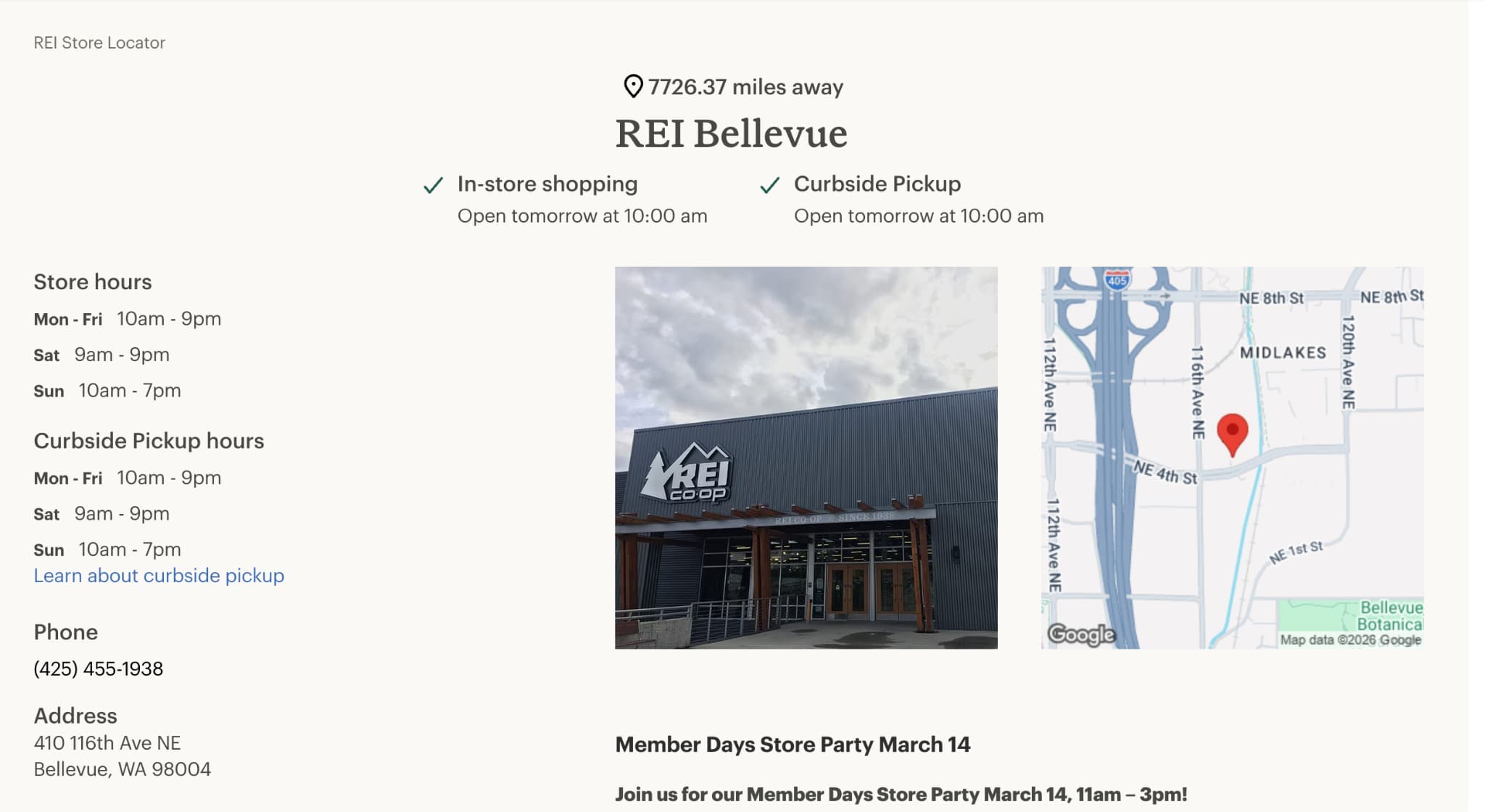
What each store location page must include:
| Page element | What to include |
| URL Structure | /stores/austin-tx/ or /locations/chicago-lincoln-park/ |
| Title Tag | [Store Name] in [City, State] — [Primary Product/Service] |
| NAP Block | Full Name, Address, Phone Number matching your Google Business Profile |
| Embedded Map | Interactive Google Map with the store pin |
| Unique Content | 150–300 words about the store, neighborhood, products, parking |
| Store Photos | Storefront, interior, team, events |
| LocalBusiness Schema | Structured data with hours, phone, address, and coordinates |
2. Optimize Google Business Profile and Local Citation Management
For retailers with physical locations, their GBP listing is often the first interaction a shopper has with your brand.
Here’s an example of a GBP listing:
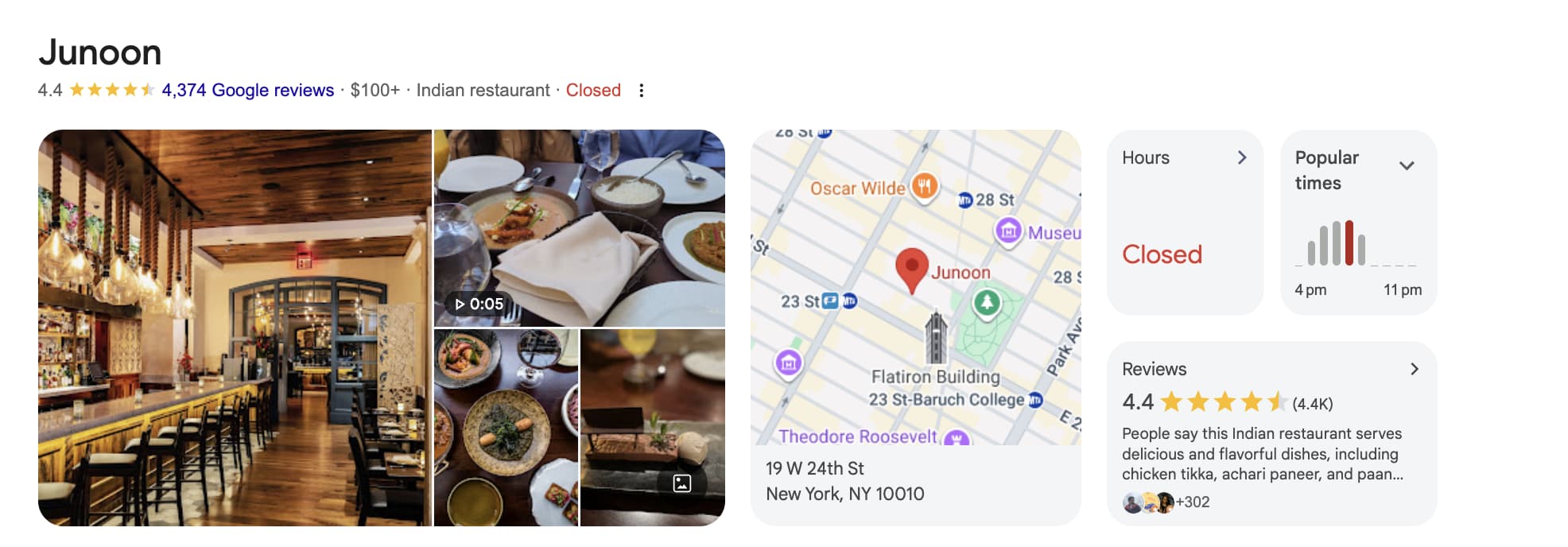
If it’s incomplete or inconsistent, your store may not appear at all.
Most retailers create a Google Business Profile once.
Then forget about it.
They also overlook citations.
Citations are mentions of your business name, address, and phone number (NAP) throughout the web. Inconsistent NAP can confuse search engines and hurt your local rankings.
Follow these tips:
- Complete every field in your Google Business Profile. Fill out your address, phone number, business hours, website URL, business categories, and business description.
- Upload your product inventory. Google lets retailers add products directly to their listing with photos, descriptions, and prices. Stores using this feature appear in product-focused local searches that listings without inventory miss entirely
- Respond to every customer review. 63.6% of consumers say they are likely to check reviews on Google before visiting a business location. So, it’s a good practice to reply to both positive feedback and complaints.
- Keep your store information identical everywhere it appears online. Make sure your business’s NAP is consistent throughout the internet.
- Audit your citations every quarter. Search for your store on retail-specific directories in your category. Fix outdated or inconsistent information to improve your rankings.
Olivia G. from Ninja Promo shares her two cents on SEO audit:
“Retailers should review their Google Business Profile whenever key business information changes, such as opening hours, location details, services, or contact information. In practice, there is rarely a formal “audit” process. What matters more is regularly checking that listings and citations stay accurate and actively managing the profile. This includes responding to reviews, updating photos or posts, and making sure the business information remains consistent.”
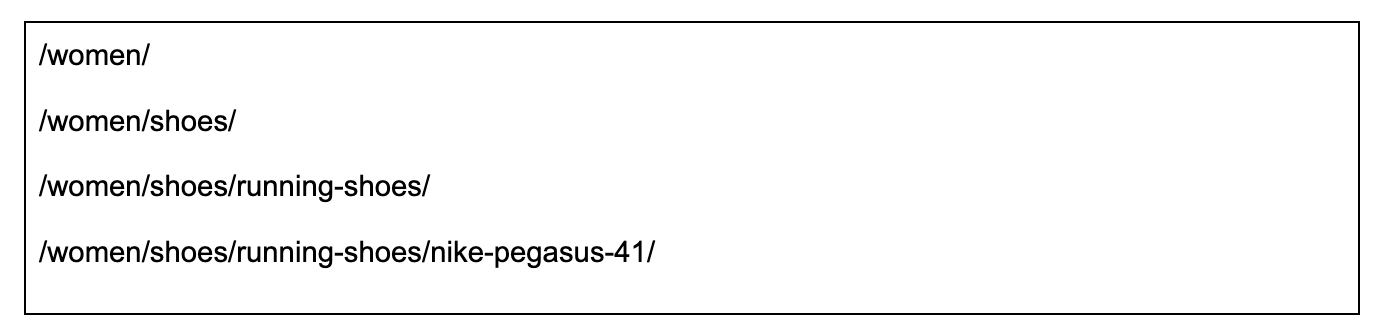
3. Create a Well-Structured Retail-Focused SEO Taxonomy
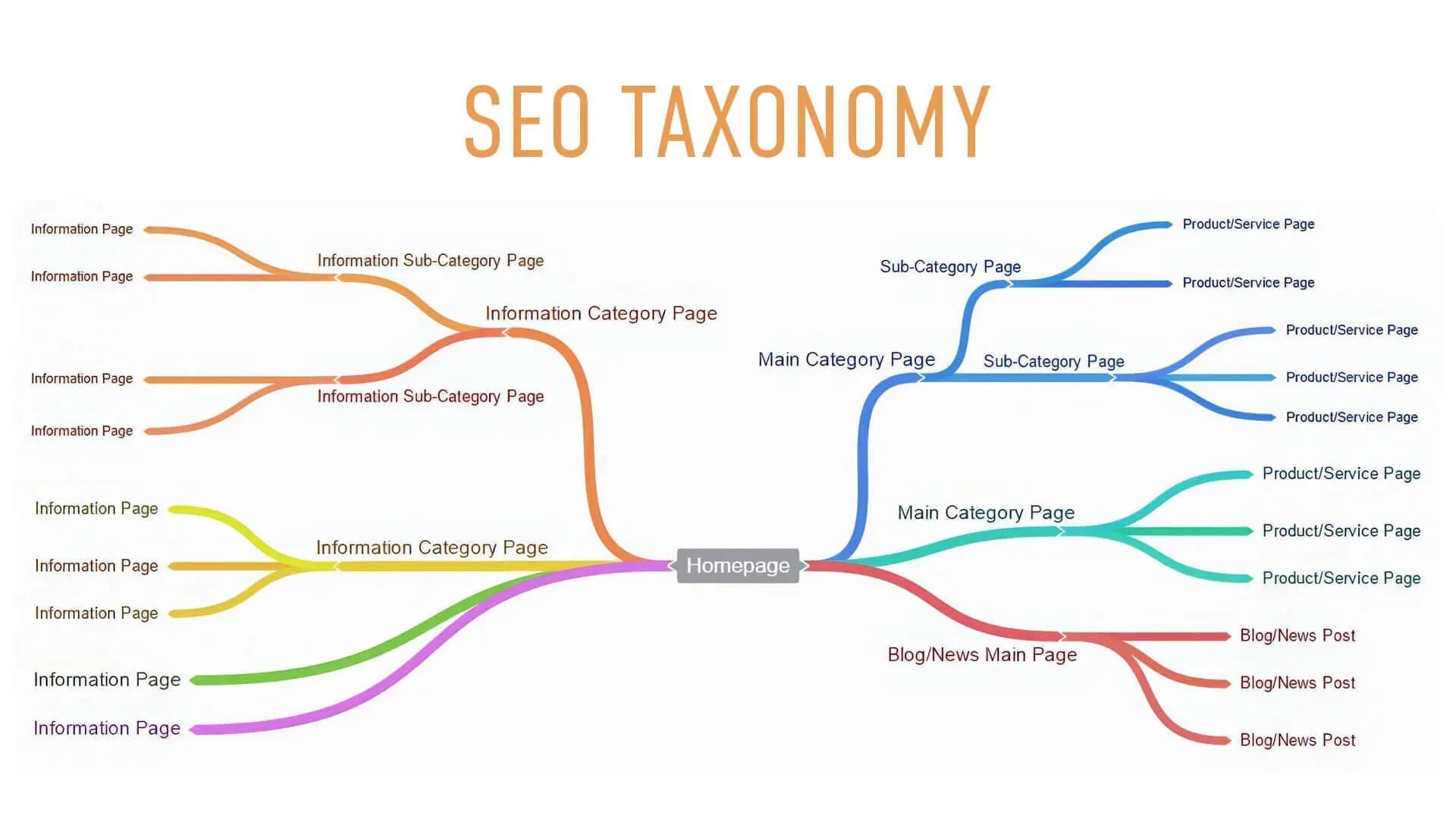
SEO taxonomy refers to how you organize your website’s categories, subcategories, and product pages.
Think of it as the floor plan of your online store.
In a physical store, you wouldn’t pile every product into a single room and expect customers to find what they need.
Products are organized by:
- Department
- Category
- Type
Your website should follow the same logic—an SEO-friendly site hierarchy mirrors the way customers naturally browse.
A clean taxonomy:
- Helps Google understand relationships between pages
- Distributes ranking authority from category pages to product pages
- Makes browsing easier for shoppers
A strong category page SEO structure ensures that shoppers and search engines can navigate your catalog with ease.
Example:
Avoid these common SEO taxonomy issues:
- Avoid generating indexable URLs for every filter variation by using canonical tags that point filtered pages back to the main category page
- Structure categories around how customers search rather than internal SKU or vendor groupings
- Keep product pages within three clicks of the homepage so users and search engines can discover them easily
These issues often develop gradually as catalogs expand. Making them easy to overlook but costly over time.
As Olivia G. explains:
“In one retail project, we worked with a site where categories had grown хаотically over time, making navigation and internal linking confusing for both users and search engines.
We restructured the taxonomy by consolidating overlapping categories, defining clear parent–subcategory relationships, and aligning pages with high-intent search queries.
After the update, the site became easier to crawl, and key category pages started ranking higher.”
4. Build Trust and Credibility Through E‑E‑A‑T Optimization
Building trust and authority signals on retail websites is foundational to how Google decides which stores to surface in search results.
E-E-A-T supports that.
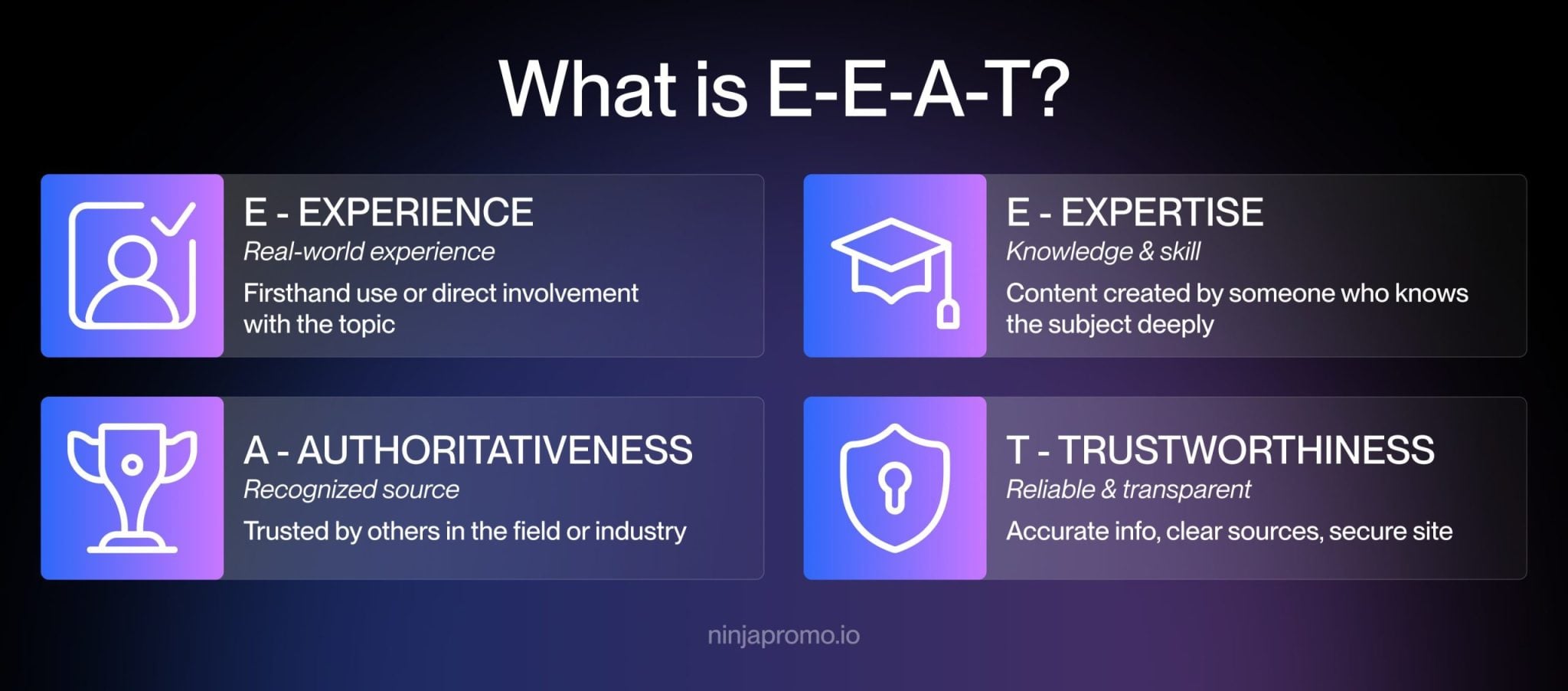
Google evaluates quality signals across your entire website.
That includes:
- Product pages
- Category pages
- Policies
- Checkout experience
Here’s what E-E-A-T looks like in retail market:
Experience
Show that real customers use and adore your products.
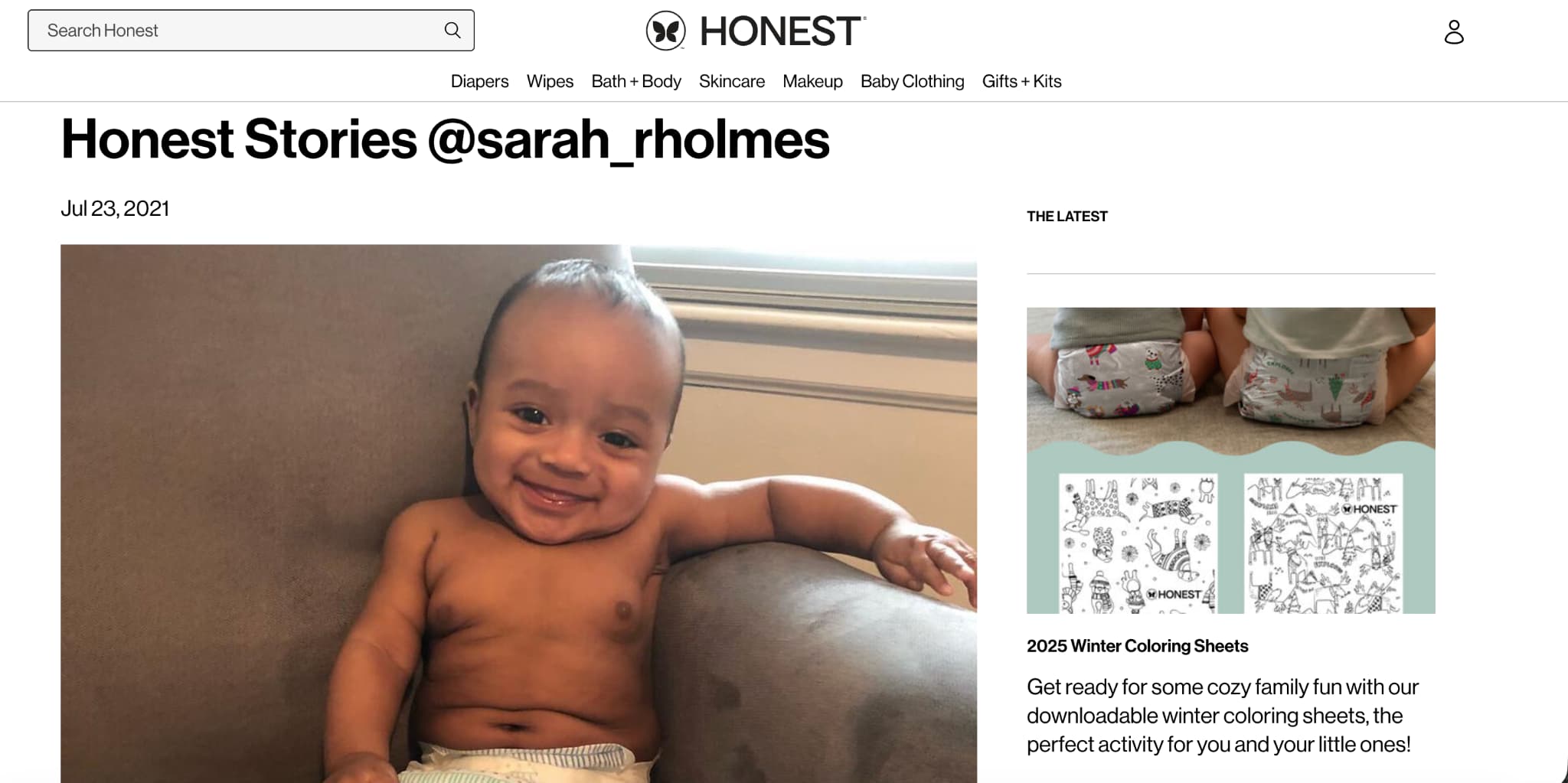
Examples include:
- Customer reviews with photos
- Video testimonials
- User-generated content
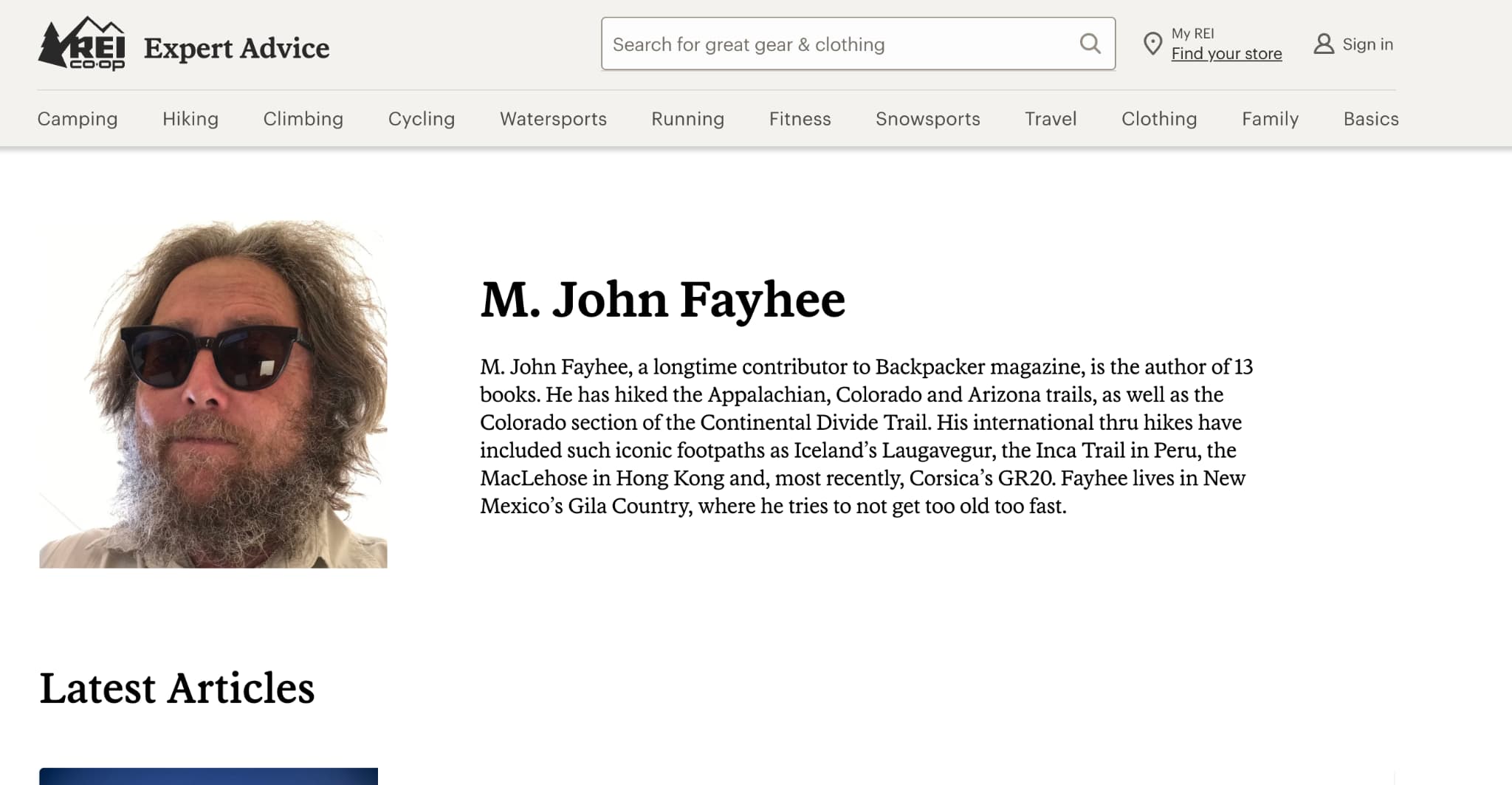
Expertise
If you publish buying guides or comparison content, attribute them to someone with relevant knowledge.
Authoritativeness
Authoritativeness comes from external validation.
Examples include:
- Backlinks from reputable industry publications
- Mentions in product roundups
- Partnerships with recognized brands
Trustworthiness
In the retail sector, trust signals are highly visible.
Strengthen trust by:
- Displaying shipping and return policies on product pages
- Showing payment methods and security badges at checkout
- Using HTTPS across the entire site

5. Deploy Strategic Internal Linking Between Categories and Products
Internal links connect one page on your website to another.
They serve two purposes:
- Help visitors navigate between related products and categories
- Pass ranking authority from stronger pages to weaker ones
On retail sites, pages that actually generate revenue (product and category pages) often sit three or four levels deep in the site structure. Very little of that authority reaches them.
Internal linking helps distribute that authority across your site.
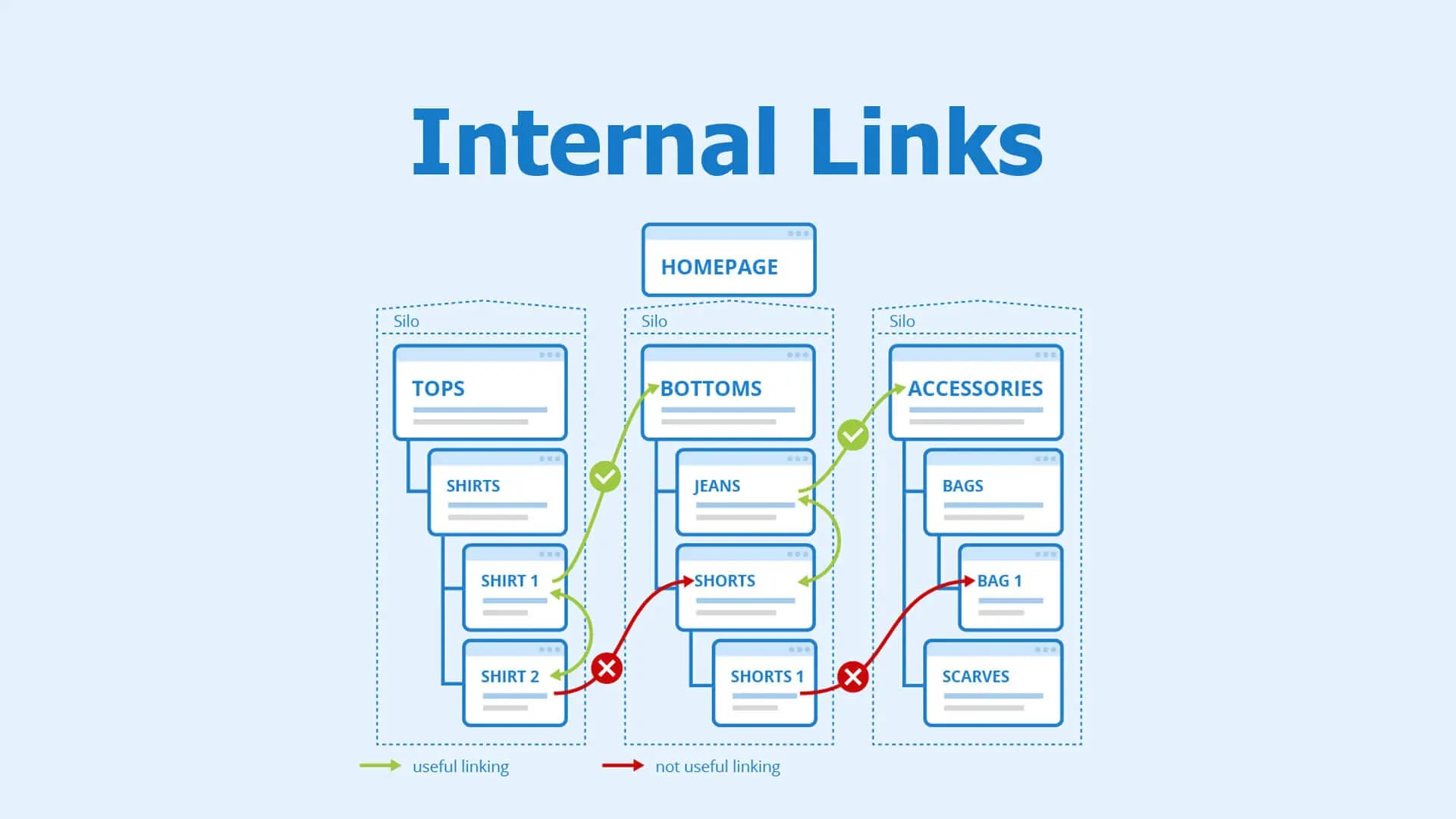
Follow these tips:
- Find pages with strong backlink profiles using tools like Semrush and add internal links from them to key category and product pages
- Replace generic phrases like “click here” with anchor text that clearly describes the linked page
- Add internal links from older relevant pages so the new page gains authority faster
6. Apply Retail UX Patterns That Maximize Crawlability and Conversions
Retail UX directly affects how easily shoppers browse your catalog. It also affects how easily search engines crawl your pages.
A well-structured retail website solves both problems.
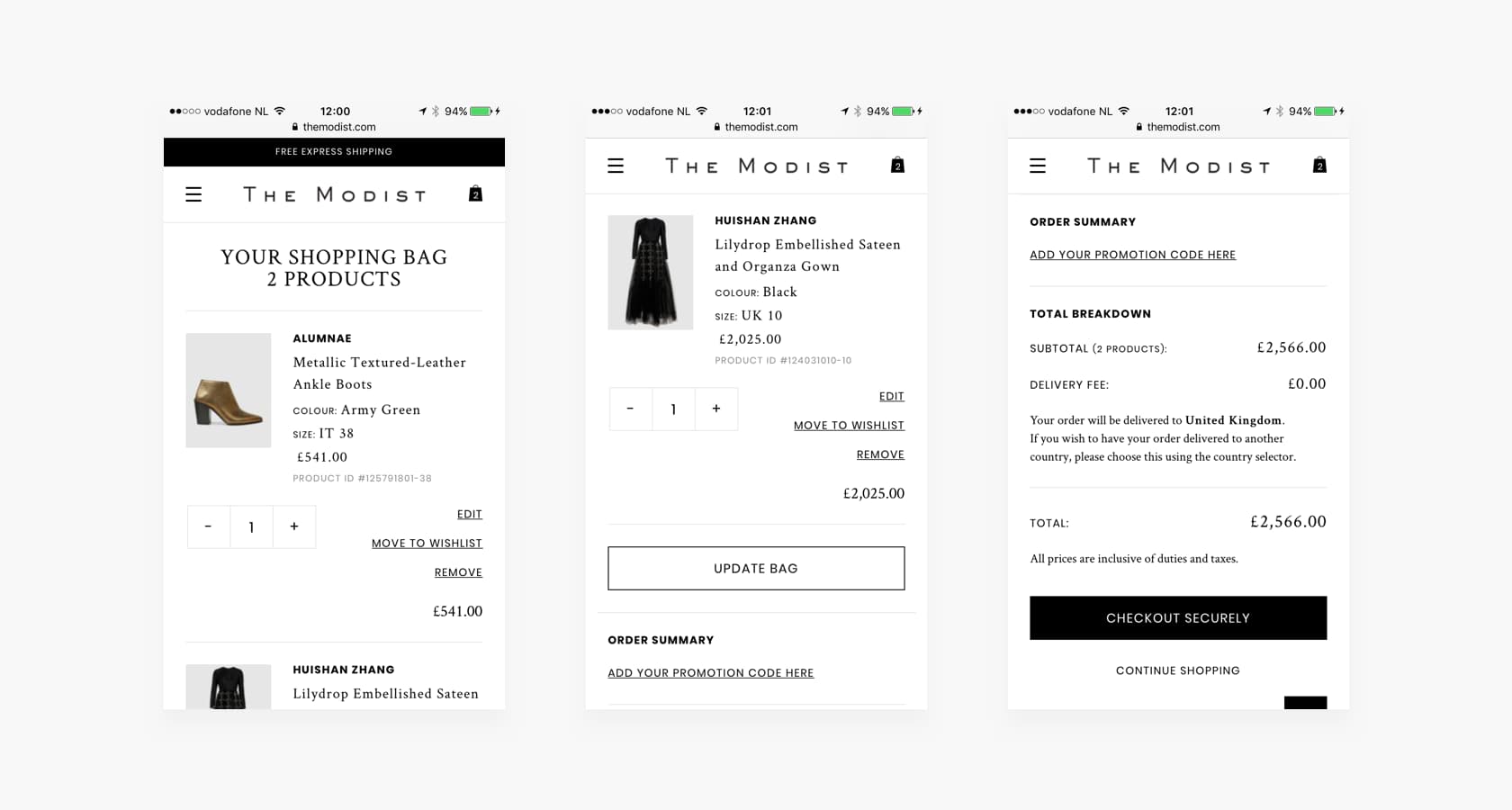
It guides shoppers through the catalog.
Also, retail UX affects SEO by helping search engines understand how products and categories relate to each other.
Mobile-first website optimization is a key part of this effort.
With the majority of retail traffic now coming from smartphones, your site’s layout, navigation, and load speed must perform flawlessly on smaller screens. These improvements also support crawlability improvements for retail stores, since Google primarily uses the mobile version of your site for indexing and ranking.
Some other UX practices involve:
- Use simple, predictable navigation that aligns with how shoppers browse and helps search engines understand your catalog structure.
- Add breadcrumb navigation to show product hierarchy, improve user navigation, and create internal links between category and product pages.
- Keep key pages within three clicks of the homepage to improve discoverability for both users and search engines.
When asked about the UX issues she most frequently sees hurting retail search engine optimization, Olivia G. from Ninja Promo points to one culprit in particular.
“One of the biggest silent killers is poor faceted navigation that creates crawl traps or bloats the index with low-value pages. It dilutes ranking signals and wastes crawl budget without most retailers even realizing it.”
7. Enhance SEO-Driven On-Site Search and No-Results Page Optimization
Optimizing on-site search functionality and no-results pages helps improve retail search results and prevents users from leaving when a search fails.
Many visitors skip category navigation and head straight to the search bar.
If the search results don’t match their query, those shoppers often leave the site.
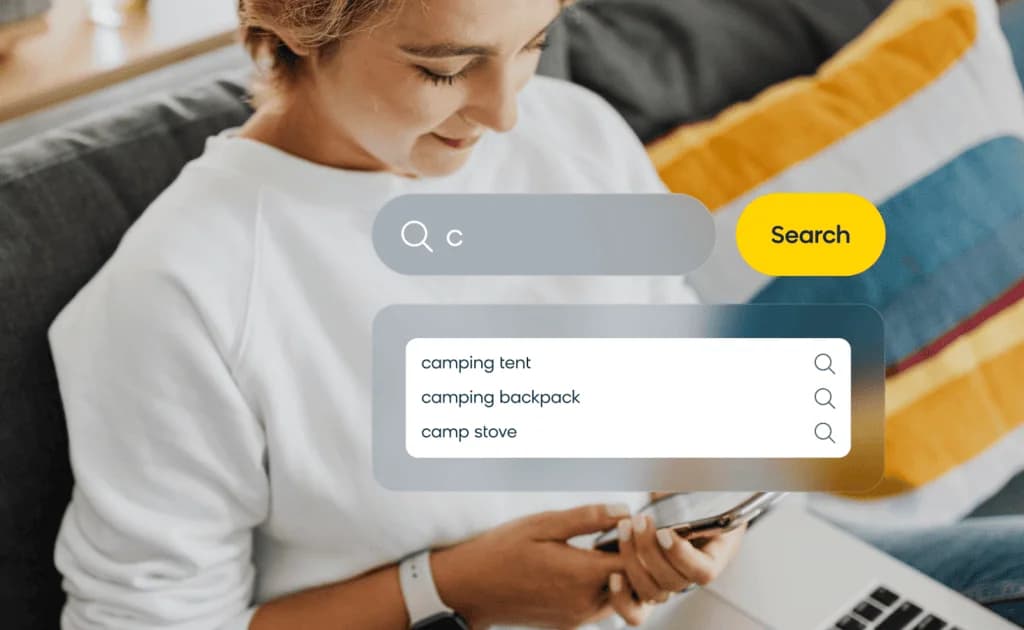
Follow these tips to improve on-site search.
- Make the search bar highly visible (ideally in the header) so users can start searching immediately.
- Enable autocomplete suggestions based on real search queries to speed up product discovery and surface relevant results.
Also, optimize your no-results page.
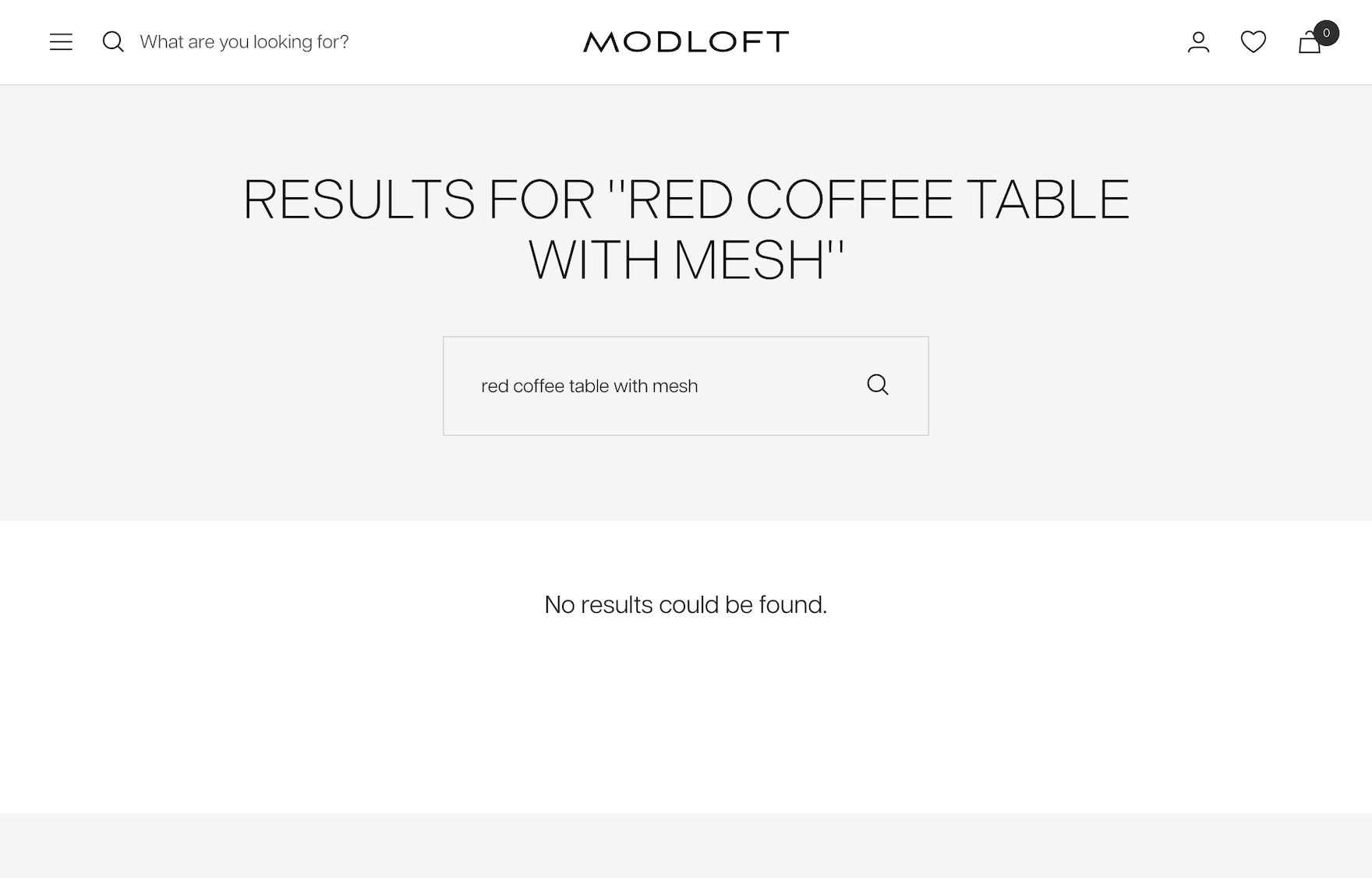
A blank “no products found” message often ends the shopping journey. Instead, guide visitors toward alternatives.
Show related categories, similar searches, or popular products to keep them browsing.
8. Build Scalable SEO Content Hubs for Retail
A content hub is a group of interlinked pages organized around a central topic.
Content hubs help search engines understand topical authority. And they help shoppers move from research to purchase.
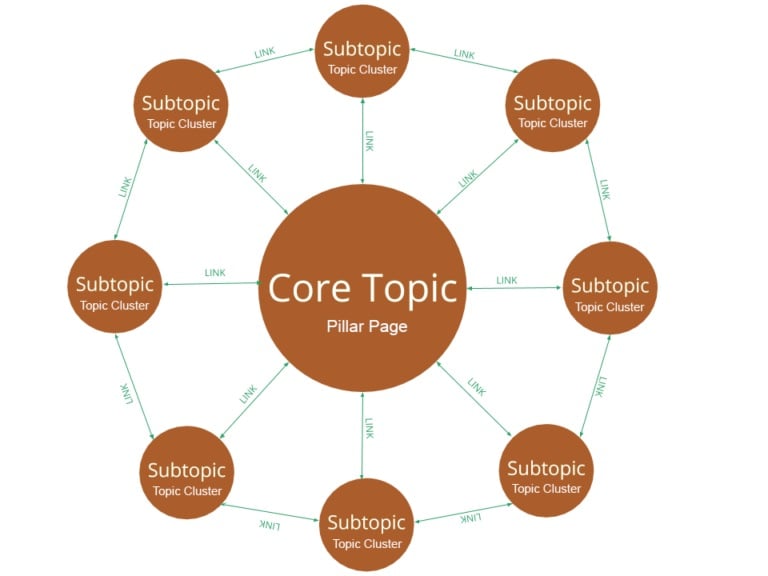
Here’s how to build a content hub that drives traffic and revenue.
- Start with a pillar page: Create a comprehensive guide around a broad product topic that links to related articles and product categories
- Build cluster content: Publish supporting pages that answer specific questions and long-tail keyword targeting related to the pillar topic
- Create shoppable collection pages: Group products around themes or use cases to combine editorial content with product discovery
Related Reading: Learn how keyword clustering works and why it’s a core SEO principle.
9. Optimize Content for AI Search
AI search optimization is the process of structuring content so AI platforms interpret, cite, and recommend it.
Why does it matter for retail stores?
Because 58% of shoppers now use generative AI instead of traditional search to find product recommendations. This makes it important to structure your content so AI platforms can easily understand and surface it.
How?
Implement these LLM SEO tactics to improve AI search ranking:
- Use the BLUF method (Bottom Line Up Front). Place the direct answer in the first sentence under each heading so AI platforms can extract it easily.
- Write question-based headings. Structure headings around real shopper questions to align with conversational search queries.
- Include cite-worthy signals. Add original data, expert quotes, or measurable comparisons to make your content more trustworthy and referenceable.
10. Improve Product Page Image Optimization
Optimized images directly improve retail product visibility by helping pages load faster and appear in Google Image results.
Images are often the heaviest elements on a retail page.
A product gallery with several high-resolution photos can easily add 10–15 MB to page weight.
That slows load times and hurts Core Web Vitals.
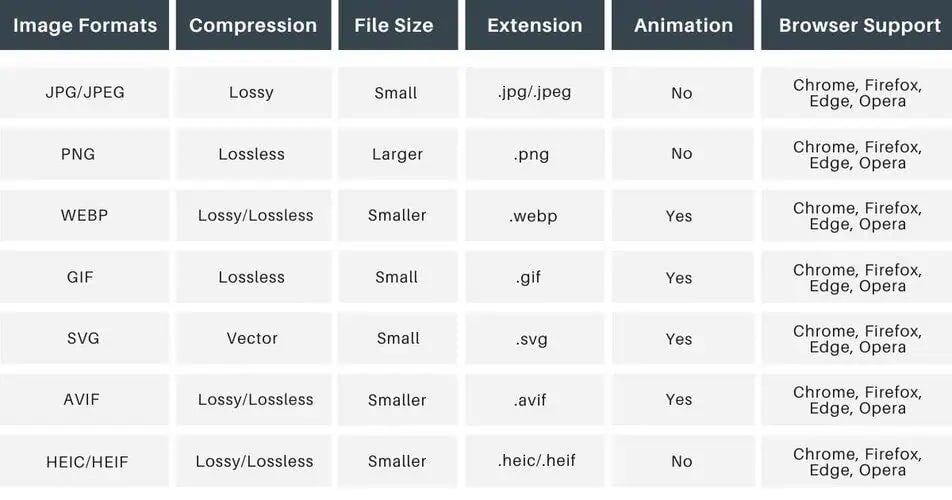
Here are several ways to optimize product images.
- Use modern formats like WebP to reduce image size by about 25–35% compared to JPEG without noticeable quality loss.
- Delay loading images below the fold so the page loads faster and the gallery appears only when users scroll.
- Write descriptive alt text to improve accessibility and help search engines understand the image.
- Provide a dedicated image sitemap in Google Search Console to help search engines discover and index product images.
With AI-generated product photography becoming more common, retailers often ask whether it helps or hurts. Vadzim Z. from Ninja Promo weighs in.
“AI-generated product photography does not usually have a major direct impact on SEO visibility, as search engines mainly evaluate the surrounding content, product information, and overall site quality. However, from a trust and conversion perspective it can create problems. AI-generated images often look overly polished or unnatural, which can make products appear different from how they look in reality. This can reduce user trust and lead to poorer behavioral signals, such as users leaving the site quickly after viewing a product page.”
11. Create Video Product Demos and 360° Views
Strong visuals reveal details that static images often miss.
This can increase purchase confidence and reduce returns.
- Video demos show the product in context. They help shoppers understand how an item looks, moves, or functions during real use.
- 360° product views provide another level of inspection. Shoppers can rotate the product and examine it from every angle.
Together, these visual formats make it easier for customers to evaluate products before buying. They also increase dwell time on product pages, which sends positive engagement signals to search engines.
Across all types of SEO, rich media is becoming a stronger search engine ranking signal, and SEO for retail websites is no exception.
Follow these tips:
- Start with products where visual detail matters such as furniture, electronics, bags, shoes, or other items shoppers want to inspect closely
- Use VideoObject schema markup so search engines can better understand and surface your video content
- Compress video files to maintain page speed since product demos rarely require resolution above 1080p
For mid-size retailers without a full production team, getting started with video doesn’t have to be expensive.
Vadzim Z. from Ninja Promo shares a practical starting point.
“Start with scrappy authentic formats like smartphone-shot demos, unboxings, or founder-led explainers, then standardize light editing templates to keep production efficient.”
Final Thoughts
The tactics outlined in this guide form a cohesive SEO for retail websites strategy that captures demand at every stage of the customer journey. When executed correctly, this approach increases visibility, improves traffic quality, and converts that traffic into both Ecommerce sales and in-store visits.