


An Ecommerce Google Ads strategy is a plan that uses targeted campaigns, audience segmentation, and smart bidding to turn ad spend into sales. It connects keywords, ads, and budgets to improve conversion rate in Google Ads and increase return on ad spend (ROAS).
In this guide, we’ll show you a clear step-by-step framework for running Google Ads for Ecommerce. You’ll see key metrics that matter most, such as ROAS, CPA, and conversion rate, as well as a real campaign example that shows how structured execution drives consistent growth.
What Is a Google Ads Strategy for Ecommerce?

An Ecommerce Google Ads strategy is a clear plan for how your ads will generate sales and profit. It defines your campaign structure, audience targeting, bidding, and budget based on revenue goals.
The strategy connects your Google Ads campaigns to the Ecommerce sales funnel. This ensures each campaign supports consistent growth, from attracting buyers to converting them.
A strong strategy includes the essentials:
- Revenue and profit targets
- Primary and secondary KPIs like ROAS, CPA, and conversion rate
- Audience segmentation based on buying intent
- Purchase-intent keyword clusters
- Budget allocation based on ROAS
- A long-term advertising roadmap
It also avoids common mistakes that waste budget:
- Running ads without clear revenue goals
- Lowering cost per click (CPC) without improving conversions
- Focusing only on one campaign instead of the full funnel
- Driving traffic without controlling cost per acquisition (CPA)
- Making short-term changes without a long-term plan
A strong Google Ads strategy framework connects targeting, messaging, bidding, and measurement into a system for driving sales.
Why Does Google Ads Drive Ecommerce Sales?
Google Ads for Ecommerce drives sales because it reaches users who are actively searching to buy. When optimized properly, it increases conversion rate in Google Ads, lowers CPA, and improves ROAS.
The key advantage is intent targeting. Unlike social media, Google Ads campaigns capture demand that already exists. This makes conversions faster and more predictable.
Here is how it directly impacts revenue:
- Search campaigns capture high-intent buyers ready to purchase
- Relevant ad copy and landing pages reduce CPA and increase conversions
- Bid optimization shifts budget toward profitable keywords
- Negative keywords and exclusions prevent wasted CPC
This way, you will have performance-driven ad spend, where every dollar supports revenue and profit targets.
Within the broader context of paid search marketing, this channel gives brands precise control over targeting, budget, and performance. This level of control makes it one of the most reliable ways to scale campaigns and achieve consistent Ecommerce growth, which pretty much answers the question, are Google Ads worth it?
The 8-Step Google Ads Strategy for Ecommerce

This Google Ads strategy follows a structured sequence: define goals, build intent-driven targeting, choose the right campaign types, optimize assets, and continuously refine performance.
When executed correctly, clear campaign structure and planning keeps your budget focused on the campaigns that bring the most profit.
1. Define Your Ecommerce Goals and KPIs
Start by defining clear revenue and profit targets and linking them to measurable primary and secondary KPIs. Without defined goals, Ecommerce Google Ads becomes traffic buying instead of structured growth.
Start with clear business targets:
- Monthly and quarterly revenue goals
- Target ROAS
- Maximum CPA
- Target conversion rate
- CPC limits based on margins
Separate KPIs into:
- Primary KPIs: Revenue, ROAS, CP
- Secondary KPIs: CPC, CTR, impression share
These targets shape every decision. Your bid optimization strategy depends on CPA and ROAS. Budget allocation depends on revenue targets. Campaign structure and keyword selection depend on product margins and profit potential.
Use a performance plan to track results. It shows which campaigns in your strategy make money and which waste your budget. Clear goals help you move budget to top-performing products, fix weak areas faster, and support Google Ads for Ecommerce product launches with controlled risk and measurable growth.
2. Conduct Keyword Research for High-Intent Keywords
Focus on keyword clusters that show buyers are ready to purchase. Keyword quality directly affects conversion rate, CPA, and ROAS.
The most common mistake is prioritizing search volume over purchase intent. High-volume keywords may look attractive, but they often carry low commercial intent. Without deep search term analysis and negative keyword management, the budget quickly gets diluted. Effective keyword research should consider funnel stage, competition, margin structure, and historical conversion data.
Dennis F, PPC Team Lead at Ninja Promo
Find high-intent keywords using:
- Google Keyword Planner for product and category terms
- Search Terms Report from existing Google Ads campaigns
- Competitor analysis tools (Ahrefs, SemRush) to identify profitable queries
Build clusters around keywords such as:
- “Buy + product name”
- Product names, SKUs, or model numbers
- “Best + product type”
- High-intent category searches
Also separate branded and non-branded keywords and group them by product category and margin. Map each cluster to relevant Search campaigns and landing pages built for Google Ads for products.
This improves traffic quality, reduces wasted CPC, and increases sales. Strong keyword research makes Google Ads for Ecommerce more predictable, scalable, and profitable. It also supports more advanced scaling through campaign structure intermediate optimization as accounts mature.
3. Segment Your Audience Based on Behavior and Demographics
Segment the audience to reach people most likely to buy. Better targeting improves conversion rate and reduces wasted spend.
Targeting is essentially traffic quality control. When we segment audiences based on purchase intent, geography, device, behavioral signals, or RFM data, we reduce the share of low-intent users. Higher-quality traffic increases conversion rate. Since acquisition cost often remains similar, improving conversion rate directly increases ROAS and overall profitability.
Dennis F, PPC Team Lead at Ninja Promo

To create audience segments use:
- In-market audiences for active shoppers
- Website visitors based on product views, cart activity, or purchases
- Customer Match lists from existing customers
- Demographics such as age, gender, and income
- Device type, including mobile and desktop
Apply these segments across Search campaigns, Shopping Ads, and Performance Max campaigns based on funnel stage:
- Top funnel: Broad audiences for discovery
- Middle funnel: Product viewers and category visitors
- Bottom funnel: Cart abandoners and past buyers
This increases ad relevance, lowers CPA, and improves ROAS. Strong segmentation makes Google Ads for Ecommerce more efficient and easier to scale.
4. Choose the Right Google Ads Campaigns for Your Ecommerce Strategy
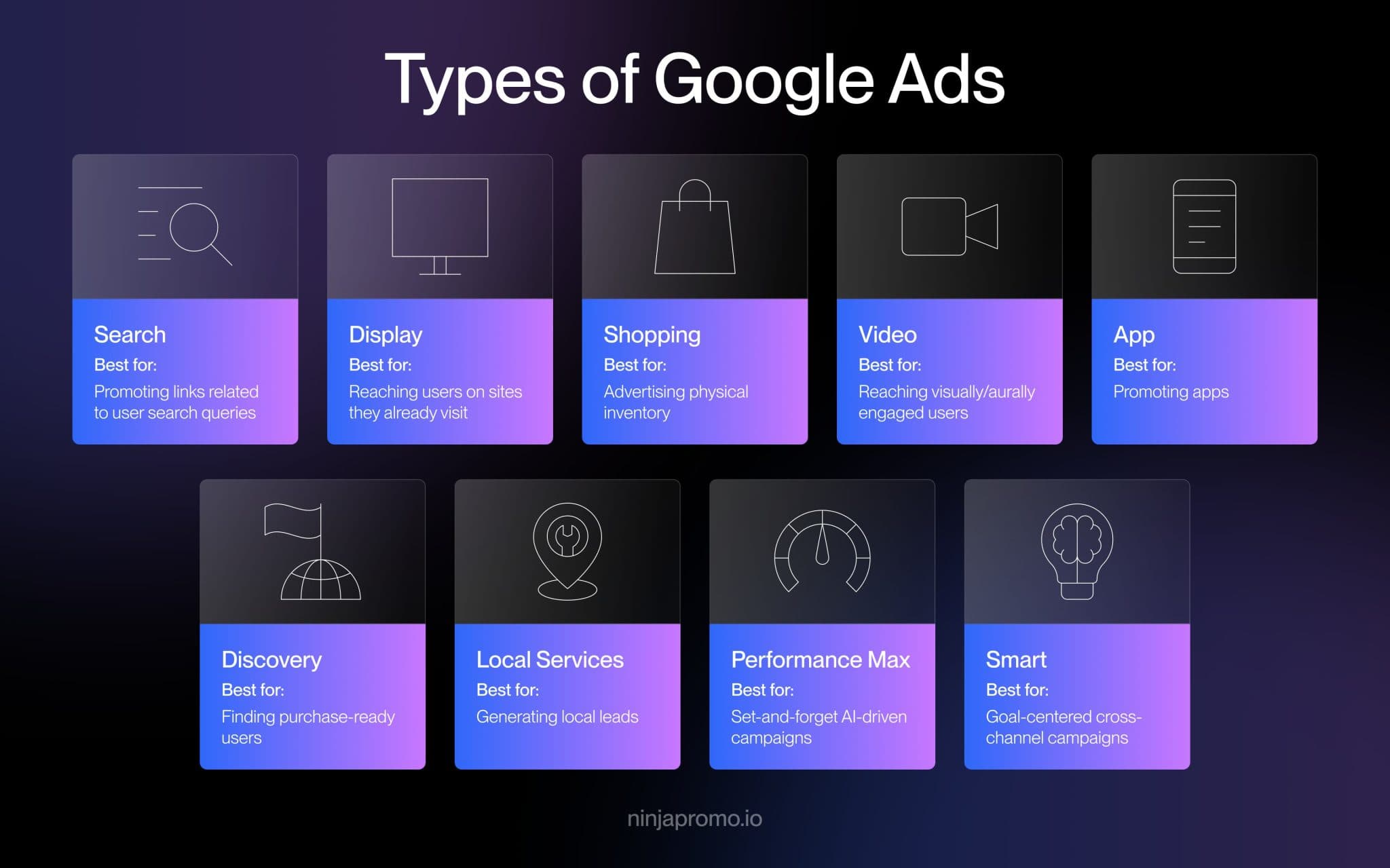
Match each of Google Ads types to a business goal:
- Shopping Ads and Google Shopping
Use Shopping Ads when the goal is direct product revenue from product feed coverage. This supports Google Ads for products and is the base layer for many profitable Ecommerce campaigns. - Performance Max campaigns (automation and scale)
Use Performance Max when you want Google to allocate inventory across channels with fewer manual levers. It is strongest when you have enough conversion data and a clean feed. - Search campaigns (highest intent and control)
Use Search campaigns for purchase-intent keyword clusters, brand protection, and SKU or model queries. This is where you control queries, ads, and landing pages most tightly. - Display campaigns (awareness and retargeting support)
Use Display to support Ecommerce marketing at the top of funnel and to re-engage visitors. Treat it as assistive spend unless your remarketing is tightly controlled.
The right mix improves ROAS, controls CPC, and supports consistent Ecommerce growth.
Google Ads campaign types comparison:
| Campaign type | Median ROAS | Pros | Cons | When to use |
| Search campaigns | 5.17 | Full control over keywords and ads | Higher CPC in competitive markets | Capture high-intent searches |
| Performance Max campaigns | 2.57 | Automated scaling across channels | Limited visibility and control | Scale campaigns with conversion data |
| Standard Shopping campaigns | 2.88 | Strong product intent and visual ads | Depends on feed quality | Capture product-focused demand |
| Display campaigns | 0.12 | Effective for remarketing | Low direct conversion rates | Retarget and build awareness |
A clear structure ensures the budget is allocated to the campaigns that drive the most revenue and profit.
5. Optimize Product Feeds for Shopping Ads

Your product feed determines when and where your Shopping Ads appear. In Google Ads for Ecommerce, feed quality directly affects traffic quality, conversion rate, and ROAS.
Improve your feed inside Google Merchant Center:
- Add purchase-intent keywords to product titles
- Place important details first, including brand, product type, size, and color
- Use clear, high-resolution product images
- Complete all required product attributes
- Group products by margin or performance
- Remove disapproved or outdated products regularly
Google Shopping uses your feed, not keywords, to match searches with products. Poor feed quality leads to irrelevant clicks, higher CPC, and lower sales.
A well-optimized feed improves visibility, attracts high-intent buyers, and makes Shopping Ads and Performance Max campaigns more profitable and scalable.
6. Set Your Bidding Strategy and Budget
Choose a bidding strategy based on your conversion data and revenue goals. Bidding directly affects ROAS and CPA.
| Criteria | Manual bidding | Automatic bidding |
| When to use |
|
|
| Why it works |
|
|
| Main limitation |
|
|
Set your budget based on results:
- Increase budget for campaigns hitting ROAS targets
- Reduce spend on low-performing products
- Avoid limiting profitable campaigns
- Separate campaigns by product margin
Bid optimization strategy keeps CPA under control, prioritizes high-margin products, and supports consistent Ecommerce growth.
7. Implement Retargeting Campaigns to Re-engage Lost Customers
Retargeting brings back users who visited your site but did not buy. It improves conversion rate and lowers CPA in Google Ads for Ecommerce.

Create audience lists based on behavior:
- Product viewers
- Cart abandoners
- Checkout starters
- Past customers for repeat sales
Use these audiences in:
- Display remarketing
- YouTube remarketing
- Search campaigns (RLSA)
- Performance Max campaigns
Increase bids for high-intent users like cart abandoners. Segment audiences by time:
- 1–3 days for immediate follow-up
- 7–14 days for reminders
- 30+ days for reactivation
Retargeting improves ROAS by focusing on users who already showed buying intent. It helps recover lost sales and makes Google Ads for Ecommerce more efficient and profitable.

8. Monitor Campaign Performance and Adjust Bids

Keep a close eye on your performance measurement plan and adjust bids based on results to increase profitability.
Bid adjustments should only be made after the learning phase has completed and statistically significant data has accumulated. Typically, that means waiting 7–14 days or at least 30–50 conversions per bidding strategy. Frequent changes disrupt algorithm stability and increase performance volatility.
Dennis F, PPC Team Lead at Ninja Promo
To make sure your conversion‑focused ad strategy works, track these key metrics:
- CTR to measure ad relevance
- CPC to control traffic cost
- ROAS to measure profit
- CPA to protect margins
Take action based on what you see:
- Low CTR: improve ad copy or targeting
- High CPC and low ROAS: lower bids or refine keywords
- High ROAS: increase budget to scale profitable Ecommerce campaigns
Shift budget to campaigns and products that meet revenue targets. Reduce spend where performance is weak.
Operational optimizations – such as search term reviews, negative keywords, and budget allocation – should happen weekly. Strategic adjustments – like restructuring campaigns or changing bidding strategies – should occur every 2-4 weeks based on sufficient data. Daily reactive changes often do more harm than good.
Dennis F, PPC Team Lead at Ninja Promo
To systematically optimize Google Ads, review performance regularly and align changes with your profit goals. Consistent optimization ensures every change supports your long-term advertising roadmap, preventing reactive decisions that reduce profitability over time.
Related Articles: If you operate in a lead-generation model rather than direct Ecommerce, explore our B2B Google Ads strategy guide.
Common Mistakes in Google Ads for Ecommerce and How to Avoid Them
Google Ads for Ecommerce often fails because of wasted spend, poor mobile performance, and weak ad testing. These mistakes increase CPA and reduce ROAS.
Not Using Negative Keywords
Negative keywords stop your ads from showing on irrelevant searches. Without them, Google Ads campaigns pay for clicks that will not convert.
For example, if you sell premium products, searches like “cheap,” “free,” or “DIY” bring low-intent users. This increases CPC and wastes budget.
Avoid this by maintaining a clean negative keyword list:
- Review the Search Terms Report regularly
- Add irrelevant queries as negative keywords
- Separate branded and non-branded keywords
- Exclude informational searches with low buying intent
This improves traffic quality, increases conversion rate, and protects your budget.
Ignoring Mobile Optimization
Mobile drives 70% of all Ecommerce traffic. If your site or ads perform poorly on mobile, you lose sales even with good targeting. As many as 53% of users will leave if the page takes more than 3s to load or if checkout is difficult. This lowers conversion rate and ROAS.
Avoid this by optimizing for mobile:
- Track mobile conversion rate separately
- Adjust bids based on device performance
- Use mobile-friendly images and vertical video in Performance Max campaigns
- Improve mobile page speed and checkout usability
Mobile optimization helps convert more traffic into sales.
Not A/B Testing Ads
Without testing, you cannot improve performance. This leads to higher CPA and missed growth. Small changes in headlines, offers, or calls to action (CTA) can significantly affect conversion rate in Google Ads.
Use a simple testing process:
- Run at least two ad versions per ad group
- Test one change at a time
- Measure results using ROAS and CPA
- Pause low performers and scale winners
Regular testing improves ad performance and helps scale profitable Ecommerce campaigns over time.
Campaign Example

DiMarca Rental Car wanted to increase brand visibility and direct bookings in a competitive luxury rental market. It turned to Ninja Promo, and we created a strategy focused on structured Google Ads campaigns aligned with measurable KPIs.
We did the following:
- Launched high-intent Search campaigns targeting luxury rental keywords
- Structured campaigns by vehicle type and audience segment
- Used negative keywords to reduce irrelevant clicks
- Applied retargeting to re-engage visitors
- Optimized landing pages for mobile users
- Tracked performance against clear KPIs
Combined SEO and paid search strengthened overall visibility and improved search demand.
The campaign delivered measurable improvements:
- +25.4% audience reach (5K+ users)
- 80K clicks, 145.6% above KPI
- +8% brand recognition among tourists (22% to 30%)
- +10% future rental intent among locals (40% to 50%)
- +25% social media engagement, reaching 6,250 followers
The results show that structured Google Ads, combined with audience targeting and ongoing optimization, can drive both direct performance and long-term brand impact.
Final Thoughts
To drive sales, you need a strategic Google Ads approach built around revenue, not clicks. Focus on:
- Targeting high-intent search queries from users ready to buy
- Optimizing your product feed and campaigns for profitability
- Tracking ROAS and CPA consistently, and scaling only what generates margin
When execution aligns with profit metrics, Google Ads for Ecommerce becomes a predictable growth channel instead of a testing ground for ad spend.