
Key Findings
- PPC audience quality depends on conversion value, not click volume or demographic precision.
- Google Ads Observation reveals audience performance without restricting existing Search campaign reach.
- Customer Match requires eligible first-party data and compliance with applicable consent requirements.
- Audience exclusions prevent converted customers from consuming acquisition budgets intended for new prospects.
- LinkedIn targeting combines professional attributes to reach relevant B2B buying committees.
Keywords, ad formats, and bids shape how a campaign competes in the auction. Yet the audience decides whether the people who see an ad ever become customers. Two advertisers can bid on the same query and walk away with very different leads. Often, the difference lies in knowing exactly whom the budget should serve.
A PPC audience strategy treats reach as a path to qualified conversions. This guide starts with audience research and segmentation, then turns to targeting options and platform-specific approaches. It closes with campaign structure, common mistakes, and performance measurement.
What Is a PPC Audience Strategy?
A PPC audience strategy is the process of identifying relevant customer groups and reaching them through paid ads. Audience data and platform targeting options determine who sees each campaign. A good plan also names the signals that identify those people and the message each group needs.
Keyword targeting reflects what a person types into a search engine at a given moment. Audience targeting adds the missing context: who that person is and how they have interacted with your brand. In PPC marketing, the two methods often work together. The keyword captures the moment, while the audience layer hints at how valuable that searcher may be.
Why Is Audience Targeting Important in PPC?
Audience targeting makes campaigns more relevant by matching each message to a group’s needs and purchase intent. Done well, it can lift traffic quality and trim spend on people unlikely to convert. The offer and landing page still matter, so targeting supports results without guaranteeing them. A clear audience targeting strategy contributes to four outcomes:
- Traffic quality: clicks come from people who match your customer profile.
- Budget efficiency: fewer impressions reach users outside your market.
- Customer acquisition: prospecting campaigns find new buyers who resemble current ones.
- Re-engagement: past visitors and leads see follow-up ads tied to their last action.
How to Build an Effective PPC Audience Strategy
An effective audience strategy begins with business goals and customer research, well before anyone opens the targeting settings. Define the conversion that matters, sketch the ideal customer, and map how their needs evolve. Data collection and segmentation then turn that research into groups a campaign can reach and measure.
1. Define Your Advertising Goals and Desired Conversions
Audience choices flow from the campaign objective. Lead generation prizes qualified form fills, while ecommerce cares about purchases and order value. Subscription businesses may watch for trials that turn into paid plans.
In Google Ads, choose primary conversion goals by business value and by the volume each action generates. Smart Bidding optimizes toward the primary actions included in campaign goals. Count a soft action such as a page view as primary, and bids may drift toward low-value users. Conversion-focused targeting follows from these choices, and the PPC budget can be split by the value each segment returns.
2. Identify Your Ideal Customer Profile
An ideal customer profile (ICP) describes the customers who bring the most value and tend to come back. Customer audience research for an ICP draws on sales calls, support tickets, and CRM data. Buyer personas then add a human layer: the motivations and objections of people inside that profile. The details of target audience analysis differ by business model:
- B2B campaigns: company size and industry, job function, and buying authority.
- B2C campaigns: needs and interests, demographics where appropriate, and purchase behavior.
3. Map the Customer Journey and Audience Intent
The audience needs change as people move from discovering a product to comparing options, buying, and returning. Customer journey mapping reveals the signals that mark each stage and the message that suits it. With that map in hand, each stage can be defined by its own audience signals.

4. Collect and Analyze Audience Data
Your existing data already shows who converts and which behaviors tend to precede a sale. Audience behavior analysis sharpens it by comparing converters and non-converters on viewed pages, session depth, and time to purchase. Before uploading customer information, confirm that consent records and your privacy policy cover advertising use. The most useful sources include:
- Website and app interactions recorded by tags.
- CRM records with deal stages and revenue.
- Offline conversions imported into ad platforms.
- Customer lists from email and loyalty programs.
CRM-based audiences built from qualified leads and existing high-value customers provide the clearest lift in lead quality. These segments offer stronger intent signals and help Google optimize toward users more likely to become paying customers.
Dennis F., PPC Team Lead at NinjaPromo
5. Segment Your Audience into Actionable Groups
Customer segmentation divides potential buyers into groups by traits and behavior, intent, or customer value. PPC audience segmentation turns those groups into campaign decisions about bids, messages, and offers. Merge groups too small to analyze until each one can guide a clear decision.
| Segmentation criterion | Audience characteristics | Potential campaign approach |
| Purchase intent | Recent pricing page visits, demo requests, or cart activity | Conversion campaign with a direct offer and higher bids |
| Lifecycle stage | First-time visitors, active leads, existing customers | Separate prospecting, nurturing, and retention campaigns |
| Customer value | High order value or long retention in CRM data | Value-based bidding and lookalike seeds built from top customers |
Key PPC Audience Targeting Options
Paid advertising audiences fall into a few broad families: identity, interests or intent, and past interactions. Each platform packages them differently. Combine methods to fit the goal and audience size, without stacking every option into one campaign.
Demographic and Firmographic Targeting
Demographic targeting uses audience demographics such as age, location, or household income where platforms offer them. What you can use depends on the platform, the country, and policies for categories like housing and credit. Firmographic targeting serves B2B campaigns through company and professional attributes. When the buying committee is known, industry, company size, and seniority help put ads in front of decision-makers.
Interest and Affinity Targeting
Interest targeting reaches people through the topics they follow and the content they engage with. Because it reflects audience interests and preferences over time, it suits prospecting and awareness campaigns. Still, a love of fitness content does not mean someone plans to buy a gym membership this week.
Once a segment has enough conversions to judge, compare its cost per qualified lead with your prospecting baseline. Keep it while that cost stays at or below the baseline. If it remains clearly above, exclude the segment from further tests. Treat engagement as a secondary check only.
In-Market and Intent-Based Targeting
In-market audiences reach users who show purchase intent signals, such as recent searches or product comparisons. That makes them a natural fit for consideration and conversion campaigns, where buyers are actively researching. These signals are modeled by the platform, so they estimate interest without confirming readiness to buy. Raise bids only when the segment outconverts unsegmented traffic in the same campaign.
Custom Audiences and Custom Segments
Custom audience segments let advertisers define a group by the intent and interests it signals. Product names and data sources vary, so the same label can describe different features on different platforms. Typical inputs include:
- Relevant search queries that indicate customer intent.
- Websites associated with your target market.
- Apps related to your audience’s interests.
Remarketing and Retargeting Audiences
Remarketing campaigns reconnect with people who have visited a site, used an app, or watched a video. The strongest message picks up where the last action left off. Product viewers might see the product, cart abandoners delivery terms, and form starters reassurance about the next step. Exclusions keep recent buyers away from offers that no longer apply.
Customer Match and First-Party Data Audiences
Customer Match and similar features use first-party customer data, such as emails, to reach or exclude existing customers. The Customer Match policy allows only data collected in a first-party context. It requires consent where law or policy demands it, and eligibility depends on account history. A reliable upload process follows four steps:
- Collect data with clear consent for advertising use.
- Upload lists through approved platform tools.
- Segment lists by lifecycle stage or customer value.
- Sync lists so departed customers drop out.
Lookalike and Similar Audiences
Lookalike and similar audience segments help platforms find new users who share traits with a source audience. Meta and Microsoft Advertising offer this feature, and LinkedIn offers predictive audiences. In Google Demand Gen, lookalike segments are shifting to a suggestion mode that may reach beyond the chosen level. Seed them with your highest-value customers, and test them against interest and in-market audiences before scaling.

How to Build an Audience Strategy for Different PPC Platforms
No two platforms share the same audience data, user behavior, or ad formats. Search engines capture active intent, social networks reach people through behavior, and LinkedIn layers in professional data. Product names and restrictions change often, so check current official documentation before launch.
Google Ads Audience Strategy
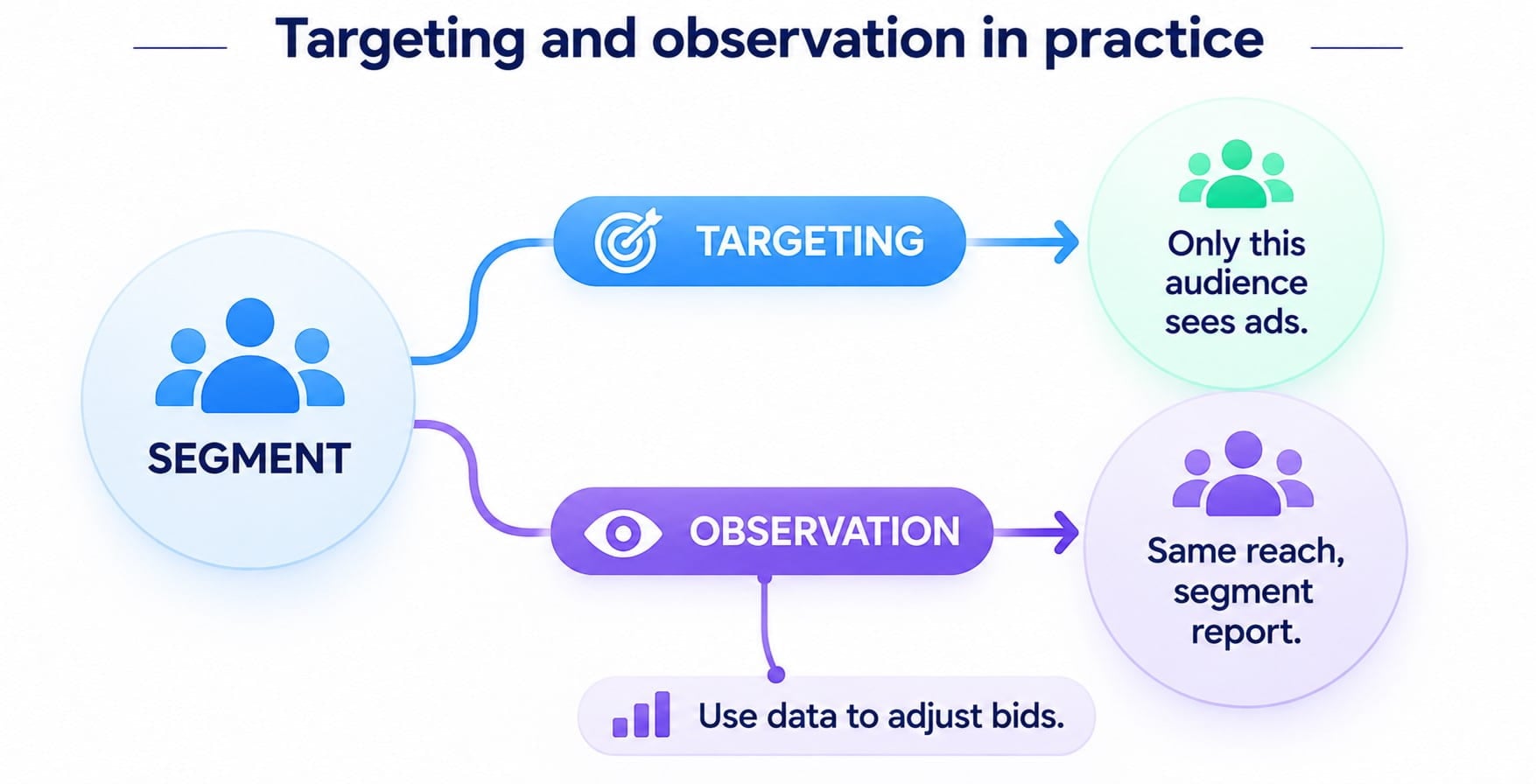
Google Ads applies audiences in two modes for many campaign types. Targeting limits who sees the ads, while observation keeps reach unchanged and reports segment performance. In Search, observe segments first and raise bids for those that beat unsegmented traffic on CPA. In AI PPC management, Performance Max uses audience signals as guidance rather than strict targeting limits.
I move an audience from observation to targeting when it consistently delivers better CPA, conversion rates, and lead quality than the campaign average. I also make sure there’s enough conversion data before narrowing the reach.
Dennis F., PPC Team Lead at NinjaPromo
Meta Ads Audience Strategy
Meta combines Custom Audiences, Lookalike Audiences, and broad targeting with Advantage+ audience features. Retargeting website visitors relies on the Meta Pixel or Conversions API, while CRM lists can seed prospecting. Advantage+ audience may expand beyond your suggestions but keeps limits such as location, age minimums, and custom audience exclusions. Start broad with customers excluded, and return to original audience controls if CRM lead quality slips below baseline.
LinkedIn Ads Audience Strategy
LinkedIn suits B2B campaigns because targeting draws on job title and seniority, industry, and company size. Matched Audiences add company lists, and predictive audiences expand from a source of at least 300 member accounts. Seed them with qualified leads or conversions so the model learns from buyers. Use broader function filters for awareness and narrower seniority filters for demo offers, widening them if delivery stalls.
Microsoft Advertising Audience Strategy
Microsoft Advertising complements search campaigns with in-market audiences, remarketing, and customer match. LinkedIn profile targeting adjusts bids by company, industry, or job function without narrowing reach. Raise bids for functions that convert above the campaign average and lower them for weaker ones. Other audiences offer bid-only or target-and-bid settings, which mirror observation and targeting in Google Ads.
| Advertising platform | Available audience options | Suitable use cases | Important considerations |
| Google Ads | Your data segments, Customer Match, in-market, custom segments | Search bid insights, Display prospecting, Performance Max signals | Observation keeps reach. Customer Match has eligibility rules |
| Meta Ads | Custom Audiences, Lookalike Audiences, Advantage+ audience | Social prospecting, website retargeting | Advantage+ may expand beyond inputs. Special ad categories exclude lookalikes |
| LinkedIn Ads | Job and company attributes, Matched Audiences, predictive audiences | B2B lead generation, account-based marketing | Minimum audience size applies. Narrow filters can raise costs |
| Microsoft Advertising | In-market, remarketing, similar audiences, LinkedIn profile targeting | Search intent with professional bid layers | Bid-only versus target-and-bid. Customer match is still rolling out |
How to Match PPC Campaigns to Different Audience Segments
Segments should shape campaign structure, budgets, and messaging. Separating prospecting, remarketing, and retention campaigns brings clearer control over spend and cleaner measurement. Split too finely, though, and conversion data scatters across campaigns that each learn slowly.
Create Separate Campaigns for Different Funnel Stages
Prospecting campaigns reach new potential customers, while consideration campaigns engage people comparing solutions. Remarketing then reconnects with earlier visitors and leads. Splitting them pays off when stages need different budgets, bids, or conversion goals. When volume is low, experienced PPC services teams often keep one shared campaign with observed segments.
Adjust Ad Messaging to Audience Needs
A single product often needs several messages, because audiences differ in awareness, intent, and objections. A new visitor may not yet recognize the problem, while a returning lead is already comparing vendors. Ad copy and landing pages should evolve with that journey.
| Audience | Main question | Message focus |
| Unaware prospects | Do I have this problem? | Name the problem and its cost |
| Active researchers | Which solution fits me? | Show differentiators and use cases |
| Engaged leads | Can I trust this provider? | Offer reviews and case results |
| Cart or form abandoners | What stops me from finishing? | Address price, delivery, or setup concerns |
Use Audience Exclusions to Reduce Wasted Spend
Audience exclusions keep ads away from irrelevant users and people who already converted. They are among the most direct ways to reduce PPC spend without cutting reach to new prospects. Their accuracy, however, depends on lists that sync with your CRM or tag data. A practical setup follows these steps:
- Exclude existing customers from acquisition campaigns.
- Suppress converted leads from lead generation campaigns.
- Remove recent buyers from cart abandonment remarketing.
- Exclude remarketing lists from prospecting to limit overlap.

What to Avoid When Targeting PPC Audiences
Poor audience decisions can undermine campaigns even when budgets and tracking are well managed. The problems below focus on targeting, data quality, and conversion measurement. Related PPC mistakes pages cover additional account-level issues that can compound these targeting errors.
Targeting Audiences That Are Too Broad or Too Narrow
Broad segments pull in many people who are unlikely to buy, while narrow ones struggle to gather enough data. The safer path is to start slightly wider than your ICP and tighten it as real conversions come in. Watch for these signals:
- Low conversion rate with high reach points to a broad audience.
- Limited impressions and unspent budget point to a narrow one.
- Rising frequency in a small segment signals creative fatigue.
Relying on Outdated or Low-Quality Data
Stale customer lists, incomplete conversion records, and broken tags quietly erode audience decisions. Converted users may keep seeing acquisition ads, and lookalike models may learn from the wrong seed. Schedule data reviews, verify tracking after site changes, and remove records when consent is withdrawn.
Ideally, I refresh Customer Match and CRM-based lists daily through automated CRM integration. If automation isn’t available, I update them weekly and regularly check match rates, audience size, and data quality.
Dennis F., PPC Team Lead at NinjaPromo
Using the Same Message for Every Audience
A first-time visitor and a returning lead need different information, offers, and calls to action. A single generic ad tends to serve neither of them well. Instead, align creative and landing pages with each audience’s stage and previous interactions.
Ignoring Audience Exclusions and Overlap
Without exclusions, ads keep reaching converted users, and campaigns compete for the same people. Overlap also muddies reporting, since several campaigns claim credit for the same conversions. Review exclusions and structure during each PPC audit to keep audience groups clean and comparisons meaningful.
Optimizing for Clicks Instead of Business Outcomes
A high click-through rate shows that an ad earns attention, which says little about whether it attracts buyers. Curiosity clicks from broad audiences can lift CTR even as lead quality slips. Judge segments by qualified leads, revenue, and customer value instead. Where sales close offline, import those conversions too.
Conclusion
An effective PPC audience strategy starts with a clear customer profile and reliable data. Segments built around intent and lifecycle stage let each campaign carry the right message and budget. Platform tools then translate those segments into targeting, observation, and exclusions.
Audience targeting is an ongoing process. Customer behavior, campaign goals, and platform features keep shifting. Testing new segments and adapting as results arrive keeps campaigns on course.